Last Updated on July 23, 2026 by andy woo
- 01 1. How Much Does Data Recovery Cost?
- 02 2. What Factors Affect Data Recovery Cost?
- 03 3. Data Recovery Service vs Data Recovery Software: Which One Should You Choose?
- 04 4. When Should You Try Data Recovery Software First?
- 05 5. How to Recover Lost Data with iFinD Data Recovery
- 06 6. How to Reduce Data Recovery Costs
- 07 7. How to Prevent Future Data Loss
- 08 8. Frequently Asked Questions About Data Recovery Cost
Introduction
Losing important files can be a stressful experience, but the cost of recovering lost data can vary significantly depending on what happened and how you choose to recover it. Accidental deletion, formatting, corrupted drives, and hardware failures may all require different recovery methods.
In general, data recovery software is usually the most affordable option for logical data loss, while professional recovery services are often more expensive because they require specialized equipment and expertise. The final cost depends on factors such as the type of storage device, the level of damage, and the complexity of the recovery process.
This guide explains how much data recovery typically costs, the differences between recovery software and professional services, and how to choose the right solution for your situation.
1. How Much Does Data Recovery Cost?
The cost of data recovery depends on several factors, including the type of data loss, the storage device involved, and the recovery method you choose. In general, data recovery can range from free software solutions to thousands of dollars for professional recovery services.
For common situations such as accidentally deleted files, formatted drives, or lost partitions, data recovery software is usually the most affordable option. However, when a storage device has physical damage or serious hardware problems, professional recovery services may be required.
The actual cost may be higher or lower depending on the condition of the storage device, the amount of data you need to recover, and whether the problem is caused by logical issues or physical damage.
2. What Factors Affect Data Recovery Cost?
The cost of data recovery varies depending on the specific situation. A deleted file from a healthy storage device is usually much easier and less expensive to recover than data from a physically damaged drive.
The main factors that affect data recovery cost include the type of data loss, the storage device involved, and the amount of data that needs to be recovered.
Type of Data Loss
The cause of data loss is one of the most important factors that determines recovery difficulty and cost. In general, logical data loss is usually less expensive because the storage device is still functioning properly, while physical damage often requires professional recovery services.
Logical Data Loss
Logical data loss occurs when the storage device is still recognized by the computer, but files become inaccessible or disappear. Common examples include accidental deletion, emptied Recycle Bin, formatting, file system errors, and partition problems.
These situations can often be solved with data recovery software because the original data may still remain on the storage device until it is overwritten. For accidentally deleted files, you can learn more about how to recover deleted files on Windows and the available recovery methods.
Physical Damage
Physical damage usually requires a different recovery approach. Problems such as clicking hard drives, damaged internal components, water damage, or storage devices that are not detected by the computer may require professional recovery services.
Because these cases often involve specialized equipment, cleanroom environments, or manual repairs, the recovery cost is usually much higher than software-based recovery.
Storage Device Type
The type of storage device also affects recovery difficulty and cost. Different devices use different storage technologies, and some require more advanced recovery methods than others.
For example, recovering files from an HDD, SSD, USB flash drive, or SD card may involve different challenges. SSD recovery can be more complicated because of technologies such as TRIM, while damaged RAID systems often require specialized techniques.
Common storage devices that may require data recovery include:
- Hard drives (HDD)
- Solid-state drives (SSD)
- USB flash drives
- SD cards and memory cards
- RAID storage systems
If you need to recover files from a camera memory card or SD card, our SD card recovery software guide provides more detailed information about the recovery process.
Amount of Data and Recovery Difficulty
The amount of data you need to recover and the complexity of the problem can also influence the final cost. Recovering a few deleted photos is usually much easier than recovering several terabytes of important business data.
In addition, factors such as severe file corruption, overwritten data, encryption, or multiple storage failures can make recovery more complicated and increase the overall cost.
For example, recovering data from a damaged hard drive may require additional steps compared with normal file deletion. You can learn more about hard drive data recovery and the recovery methods available for different drive problems.
3. Data Recovery Service vs Data Recovery Software: Which One Should You Choose?
Choosing between data recovery software and a professional recovery service depends mainly on the cause of data loss and the condition of your storage device.
For most common situations, such as accidental deletion, formatting, or lost partitions, data recovery software is usually the faster and more affordable option. However, when a storage device has physical damage or serious hardware problems, professional recovery services may be necessary.
When Should You Choose Data Recovery Software?
Data recovery software is a good choice when your storage device is still detected by your computer but your files are missing, deleted, or inaccessible.
Common situations where recovery software can help include:
- Accidentally deleted files
- Files removed after emptying the Recycle Bin
- Formatted hard drives or memory cards
- Lost or deleted partitions
- Missing photos, videos, documents, or other files
Compared with professional recovery services, recovery software is usually much more affordable and allows you to scan and preview recoverable files before making a decision.
For these situations, iFinD Data Recovery provides an easy-to-use solution to scan storage devices, preview found files, and recover lost data.
When Do You Need a Professional Data Recovery Service?
A professional data recovery service may be required when the storage device has physical damage or cannot be recognized by your computer.
Examples include:
- A hard drive making clicking or unusual noises
- A drive that is not detected by any computer
- Severely damaged storage components
- Water damage, fire damage, or physical impact
- Critical business data stored on failed devices
In these situations, opening the device or continuing to use it may make the damage worse. Professional recovery labs use specialized equipment and controlled environments to repair and extract data from damaged devices.
Data Recovery Software vs Professional Service: Quick Comparison
For most personal data loss situations, trying data recovery software first is usually the most practical choice because it is affordable and does not require sending your device away.
However, if the storage device has physical damage or contains extremely important data, a professional recovery service may provide a better chance of successful recovery.
4. When Should You Try Data Recovery Software First?
In many data loss situations, trying data recovery software first is the most practical and affordable approach. If your storage device is still detected by your computer and there is no obvious physical damage, recovery software may be able to find and restore your lost files.
Before paying for professional recovery services, check whether your situation matches the common cases below.
Your Drive Is Still Recognized by Windows
If your hard drive, SSD, USB drive, or memory card appears normally in Windows but your files are missing, recovery software is usually worth trying first.
This situation usually indicates logical data loss rather than physical damage. The files may still exist on the storage device, but Windows can no longer display or access them correctly.
Common examples include:
- Deleted files that are no longer in the Recycle Bin
- Missing photos or videos from a memory card
- Formatted drives
- Lost partitions
- Files becoming inaccessible after file system errors
You Lost Files Due to Accidental Deletion or Formatting
Accidental deletion and formatting are among the most common reasons people need data recovery. In these cases, the actual data may not be removed immediately. Instead, the storage space is marked as available for new data.
This means the sooner you stop using the device and start recovery, the better chance you have of recovering your files successfully. Learn more about how to recover deleted files in our step-by-step guide.
You Want to Preview Recoverable Files Before Paying
One advantage of using data recovery software is that you can usually scan your device and preview the recoverable files before purchasing a full license.
This allows you to confirm whether your important files can be found before spending money on recovery.
For users with logical data loss, iFinD Data Recovery provides a simple way to scan storage devices, preview recoverable files, and restore lost data without professional recovery fees.
5. How to Recover Lost Data with iFinD Data Recovery
Step 1 Install iFinD Data Recovery
Download and install iFinD Data Recovery on your computer. The simple interface allows you to start scanning your storage device and check whether your lost files can be recovered before purchasing a license.
Recover Your Lost Data Without Expensive Recovery Services.
iFinD allows you to scan and preview recoverable files first. Recover up to 1GB of data for free before choosing a full license.
Step 2 Select File or Partition Recovery
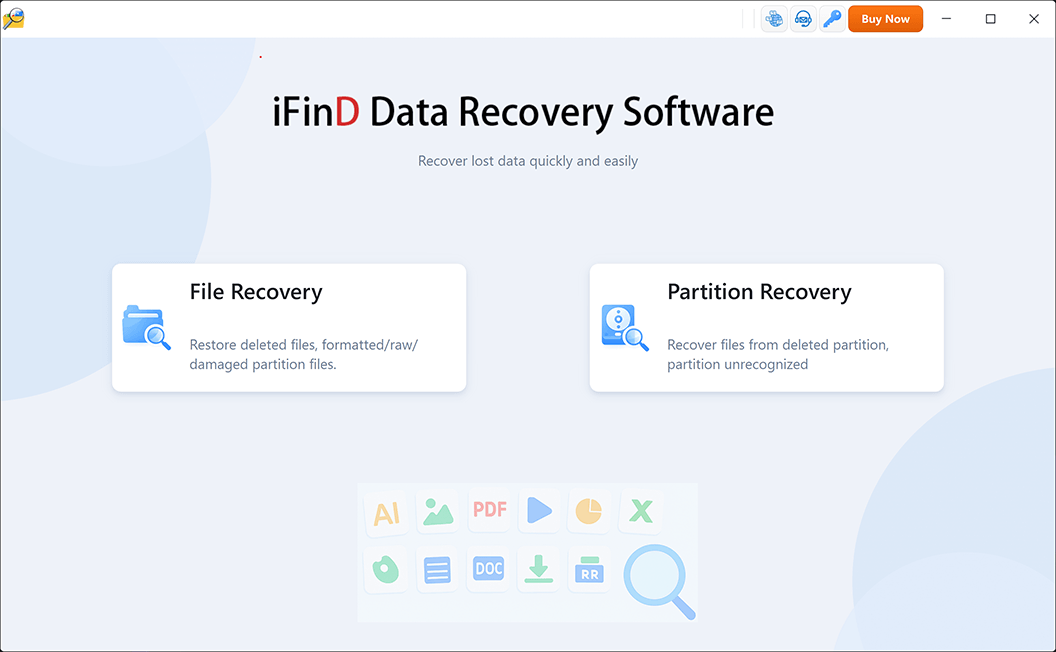
Choose the recovery mode based on your data loss situation: “File Recovery” or “Partition Recovery.”
If the partition where your files were stored is still visible and can be recognized by Windows, choose “File Recovery” mode.
This mode scans the selected drive or partition for deleted files and helps recover data that is no longer accessible but has not been overwritten.
However, if the partition or drive is missing, damaged, or cannot be detected by Windows, choose “Partition Recovery” instead.
In this situation, the first goal is to restore the lost partition structure. Once the missing partition is recovered, you can access and recover the files stored on it.
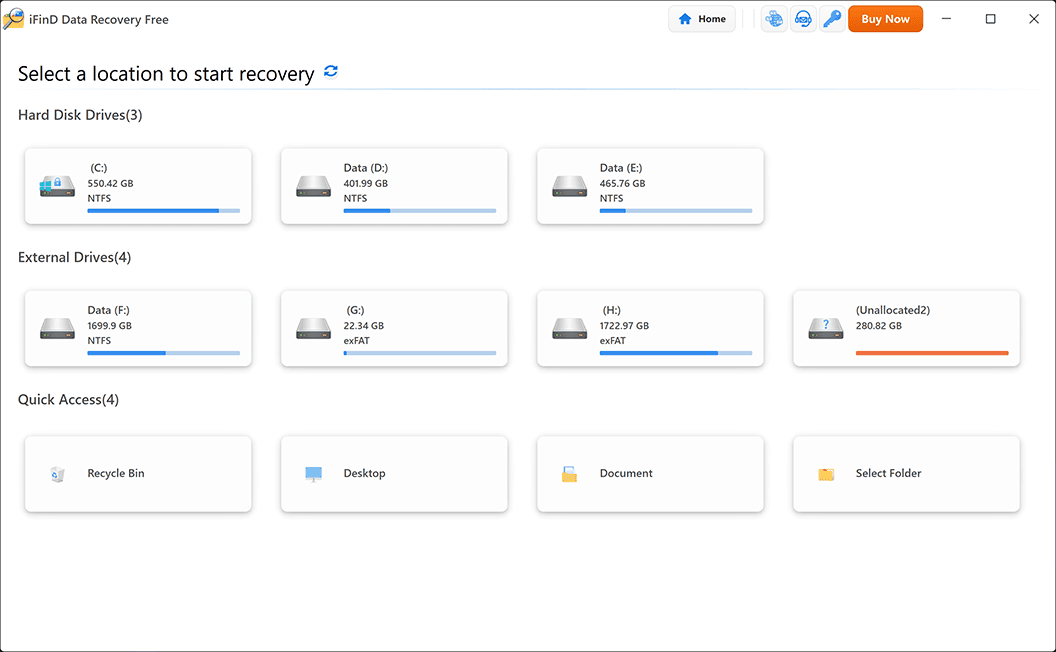
Step 3 Select the Location Where Your Data Was Lost
Select the drive or storage device where your lost files were originally stored, such as a hard drive, SSD, USB flash drive, SD card, or other external storage device.
Step 4 Scan and Preview Recoverable Files
After scanning, iFinD Data Recovery will display recoverable files from the selected storage device. You can preview available documents, photos, videos, and other data before recovery to confirm whether the required files can be restored.
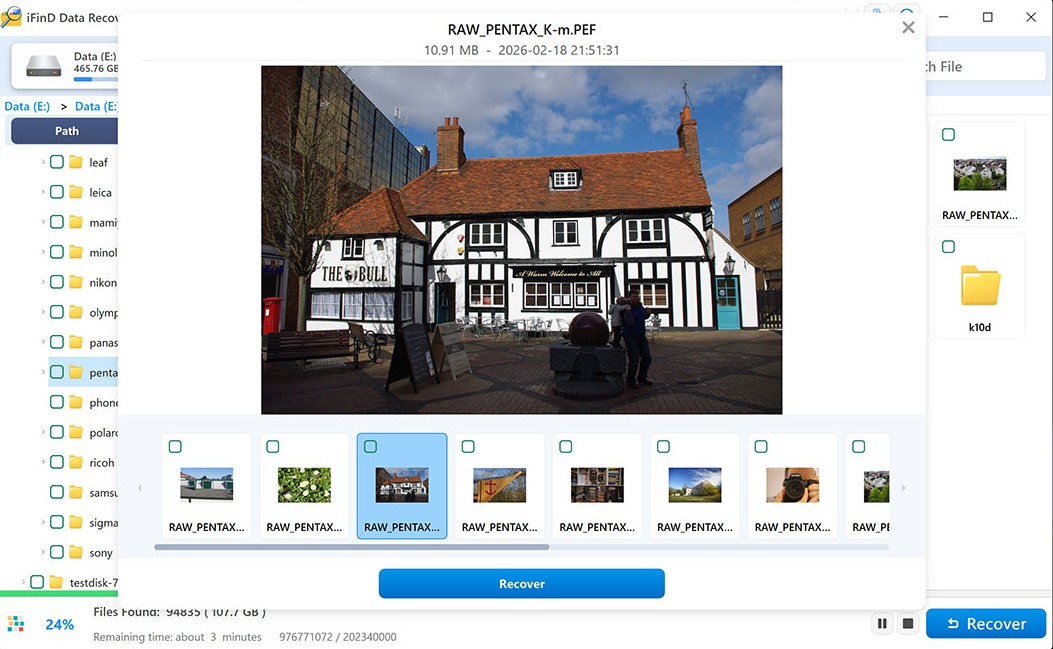
Step 5 Recover Lost Files to a Safe Location
After previewing the files you need, select them and click the Recover button. Choose a safe location to save the recovered data.
Important: To avoid overwriting other lost data, do not save recovered files back to the same drive or storage device where they were originally lost. For example, if you are recovering files from an SD card, save them to your computer’s hard drive or another external storage device instead.
Once the recovery process is complete, open the selected folder and verify your recovered files.
6. How to Reduce Data Recovery Costs
Although data recovery costs can vary significantly, there are several ways to reduce unnecessary expenses. The most important factors are acting quickly, choosing the right recovery method, and avoiding actions that may make data recovery more difficult.
The following tips can help you recover lost data while keeping the cost as low as possible.
Stop Using the Storage Device Immediately
After losing important files, stop writing new data to the affected storage device as soon as possible. New files, software installations, or other operations may overwrite the deleted data and reduce the chance of successful recovery.
For example, if files were deleted from an SD card, USB drive, or hard drive, avoid continuing to use the device until you have attempted recovery.
Try Data Recovery Software Before Professional Services
For common logical data loss situations, data recovery software is often the most affordable option compared with professional recovery services.
If your storage device is still detected by Windows and there is no obvious physical damage, try recovery software first to scan and preview your lost files before paying for professional services.
Key Point: Try data recovery software first when your device is still recognized and the issue is caused by accidental deletion, formatting, or file system errors.
Compare Recovery Options Before Paying
Before choosing a recovery solution, consider the type of data loss, the condition of your storage device, and the value of the missing files.
For example, simple deleted file recovery may only require affordable software, while physically damaged drives may require professional recovery services with specialized equipment.
Maintain Regular Backups to Avoid Future Costs
The best way to avoid expensive data recovery is to maintain regular backups of important files. A reliable backup strategy can help you restore your data without paying for recovery software or professional services after unexpected data loss.
Windows users can use built-in Windows backup features or cloud backup solutions to protect important documents, photos, videos, and other files.
7. How to Prevent Data Loss in the Future
Although data recovery solutions can help restore lost files, preventing data loss is always the best approach. A good backup strategy and safe storage habits can reduce the risk of losing important documents, photos, videos, and other valuable data.
The following practices can help protect your files and avoid unexpected data recovery costs in the future.
Keep Regular Backups of Important Files
Regular backups are one of the most effective ways to prevent permanent data loss. Keep multiple copies of important files in different locations, such as an external hard drive, cloud storage, or another backup device.
For Windows users, built-in backup tools and cloud backup solutions can help protect important files and make recovery easier after unexpected problems.
Avoid Overwriting Lost or Deleted Data
When files are accidentally deleted, formatted, or become inaccessible, avoid using the affected storage device until you have attempted recovery. New data written to the device may overwrite the original files and make recovery more difficult.
For example, if files are lost from an SD card, USB drive, or hard drive, stop saving new files to the device and use another location to store recovered data.
Safely Manage Storage Devices
Improper handling of storage devices can increase the risk of data loss. Always safely eject external drives, avoid interrupting file transfers, and do not disconnect storage devices while data is being written.
These simple habits can help prevent file system errors, corruption, and unexpected partition problems.
Monitor Drive Health and Replace Failing Devices
Storage devices do not last forever. Signs such as unusual noises, slow performance, frequent errors, or a drive that is not recognized by the computer may indicate potential failure.
If a device shows signs of failure, back up your important files as soon as possible and consider replacing the drive before complete data loss occurs.
8. Frequently Asked Questions About Data Recovery Cost
Q1. How much does professional data recovery usually cost?
Professional data recovery services typically cost from a few hundred dollars to several thousand dollars, depending on the type of damage, storage device, and recovery difficulty.
Simple logical problems may cost less, while physically damaged drives that require specialized equipment or cleanroom services are usually much more expensive.
Q2. Is data recovery software cheaper than professional recovery services?
Yes. For common logical data loss situations, data recovery software is usually a much more affordable option than professional recovery services.
If your storage device is still detected by your computer and there is no physical damage, recovery software can often help you scan, preview, and restore lost files at a lower cost.
Q3. Can I recover lost data for free?
Yes. Some data recovery software provides free recovery options with limited recovery capacity. Free tools can be useful for simple data loss situations, such as accidentally deleted files or recently lost documents.
However, more complicated cases may require paid software or professional recovery services depending on the condition of the storage device.
Q4. When should I use data recovery software instead of a recovery service?
You should try data recovery software first when the problem is caused by accidental deletion, formatting, file system errors, or other logical issues and the storage device is still recognized by your computer.
Professional recovery services are usually needed when the device has physical damage, such as clicking hard drives, damaged components, or severe hardware failure.
Q5. Does the amount of recovered data affect the recovery cost?
Yes. The amount of data and recovery complexity can influence the final cost, especially when using professional recovery services.
Recovering a small number of deleted files is usually simpler than recovering large amounts of data from damaged storage devices or complex systems.
Q6. Is it worth paying for data recovery?
Whether data recovery is worth the cost depends on the value of the lost files and the difficulty of recovery. Important business documents, personal photos, and irreplaceable files may justify the expense.
For common data loss situations, trying reliable recovery software first can help determine whether your files can be recovered before paying for expensive professional services.