Last Updated on July 23, 2026 by andy woo
You have just returned from a memorable farewell party with your friends. You have taken hundreds of those beautiful moments and saved them in your device and are eager to share them with your loved ones.
But then, suddenly you accidentally delete the entire camera folder from your PC. Now that’s the worst problem many of us face because we are unable to find a way to recover them. Even though you tried various methods none of them worked. You tried to figure out any way to get back your lost files. Fortunately, there are some professional data recovery software for Windows (7/8/10 and Windows 11) and Mac on the Internet for you to instantly get back the photos you have deleted.
Check out this guide and see what are the best data recovery software for Windows or Mac.
- 01 1. Quick Comparison: Best SD Card Recovery Software
- 02 2. Best SD Card Recovery Software Comparison
- 03 3. Best SD Card Recovery Software Comparison
- 04 4. How We Tested SD Card Recovery Software
- 05 5. Features to Look for in SD Card Recovery Software
- 06 6. How to Choose the Right SD Card Recovery Software?
- 07 7. Frequently Asked Questions
1. Quick Comparison: Best SD Card Recovery Software
Choosing the right SD card recovery software is a decisive factor when attempting to rescue accidentally deleted photos, 4K video streams, proprietary camera RAW files, and lost projects from formatted memory cards.
To establish an objective evaluation, we benchmarked and compared leading data recovery utilities across key operational metrics: sector scanning efficiency, RAW signature mapping, real-time file preview performance, structural directory retention, free trial thresholds, and long-term pricing value.
Quick Overview: Best SD Card Recovery Software Options
Based on our benchmark evaluations, iFinD Data Recovery strikes an exceptional balance between high-precision parsing power, multi-brand RAW format recognition, original folder tree preservation, and long-term pricing value.
💡 Editor's Choice: While select tools may reach slightly higher raw counts in specific fringe tests, iFinD Data Recovery provides the most complete and accessible user experience by combining real-time file previewing, intact folder hierarchy reconstruction, and a generous 1GB free tier.
2. Best SD Card Recovery Software Comparison
Why iFinD Data Recovery Stands Out from Other SD Card Recovery Software?
Choosing SD card recovery software is not only about whether it can find deleted files. A reliable recovery tool should support different file types, work with various storage devices, maintain original file quality, and provide an affordable recovery solution.
iFinD Data Recovery combines powerful scanning technology with broad file format support, making it a practical choice for recovering deleted photos, videos, documents, and RAW camera files from SD cards.
1. Support More File Types and RAW Formats
SD cards are commonly used in cameras, smartphones, drones, and other devices, which means users may need to recover different types of files. iFinD Data Recovery supports a wide range of file formats, including photos, videos, documents, archives, and professional camera RAW formats.
For photographers, iFinD can recover RAW image files from popular camera brands, including:
2. Advanced File Scanning and Recovery Performance
When files are deleted from an SD card, the data may still remain on the storage device until it is overwritten. iFinD Data Recovery uses advanced scanning methods to locate recoverable files and helps users restore photos, videos, and other important data from deleted, formatted, or damaged SD cards.
In many recovery scenarios, iFinD can detect files that may not be found by basic recovery tools, while keeping the original file structure whenever possible.
3. More Affordable Recovery Solution
Data recovery software can vary significantly in price, especially when users only need to recover files occasionally. iFinD Data Recovery provides an affordable option with a free recovery limit of up to 1GB, allowing users to test the recovery capability before purchasing.
Compared with many professional recovery tools that require expensive subscriptions, iFinD offers powerful recovery features at a more accessible price.
3. Best SD Card Recovery Software Comparison
Choosing the right SD card recovery software depends on several factors, including recovery performance, supported file types, ease of use, and pricing. We compared several popular recovery tools to help users find the best solution for recovering deleted photos, videos, RAW images, and other files from SD cards.
iFinD Data Recovery
iFinD Data Recovery is a comprehensive SD card recovery solution designed for users who need to recover deleted photos, videos, documents, and RAW camera files. It supports recovery from SD cards, USB drives, hard drives, SSDs, and other storage devices.
Compared with many recovery tools that limit features in their free versions, iFinD provides up to 1GB of free recovery, allowing users to test the recovery performance before purchasing.
It is especially suitable for photographers and everyday users who need RAW photo recovery support, broad file format compatibility, and an affordable recovery option.
EaseUS Data Recovery Wizard
EaseUS Data Recovery Wizard is one of the well-known data recovery programs for Windows and macOS. It provides an easy-to-use interface and supports recovering files from SD cards, hard drives, and external storage devices.
It is a popular choice for beginners who prefer a simple recovery process. However, the free version has recovery limitations, and users may need to upgrade to a paid plan for larger recovery tasks.
Disk Drill
Disk Drill is a popular recovery tool known for its modern interface and support for multiple platforms. It can recover files from SD cards, USB drives, internal disks, and other storage devices.
It is suitable for users who value a simple user experience. However, some advanced recovery features require a paid license, making it less suitable for users looking for a more affordable recovery solution.
Recuva
Recuva is a lightweight Windows recovery tool that is popular because of its free version and simple operation.
It works well for basic file recovery scenarios, especially when users need to restore recently deleted files. However, compared with professional recovery software, it may have limitations when dealing with formatted SD cards, complex data loss situations, or professional RAW photo recovery.
4. How We Tested SD Card Recovery Software
To compare different SD card recovery software fairly, we evaluated each tool based on several important factors that users care about most, including recovery capability, supported file types, ease of use, and pricing.
Our testing focused on common SD card data loss situations, such as accidental deletion, formatting, and lost photos or videos from cameras and other devices.
Formatted SD Card Recovery Test
To evaluate formatted SD card recovery performance, we performed a real-world test using the same formatted storage partition and compared the recovery results from several popular data recovery tools.
Formatting an SD card usually removes or rebuilds the file system information that manages file locations and folder structures. However, the original file data may still remain on the storage device until it is overwritten by new data. A capable recovery tool needs to analyze storage sectors and identify recoverable files even when the original file system information is no longer available.
- Test Type: Formatted SD card recovery test
- Data Loss Scenario: Storage partition formatted before recovery scanning
- Recovery Goal: Compare file detection results and recovery quality after formatting
Tested Software:
To ensure a fair comparison, all recovery tools were tested under the same formatted SD card recovery scenario using the following process:
- Prepare a reference partition containing multiple test files.
- Format the partition to simulate an accidental SD card formatting situation.
- Run each recovery tool using its available deep scanning and file recovery functions.
- Record the number of recoverable files detected by each software.
Test Results
Test Analysis & Key Findings
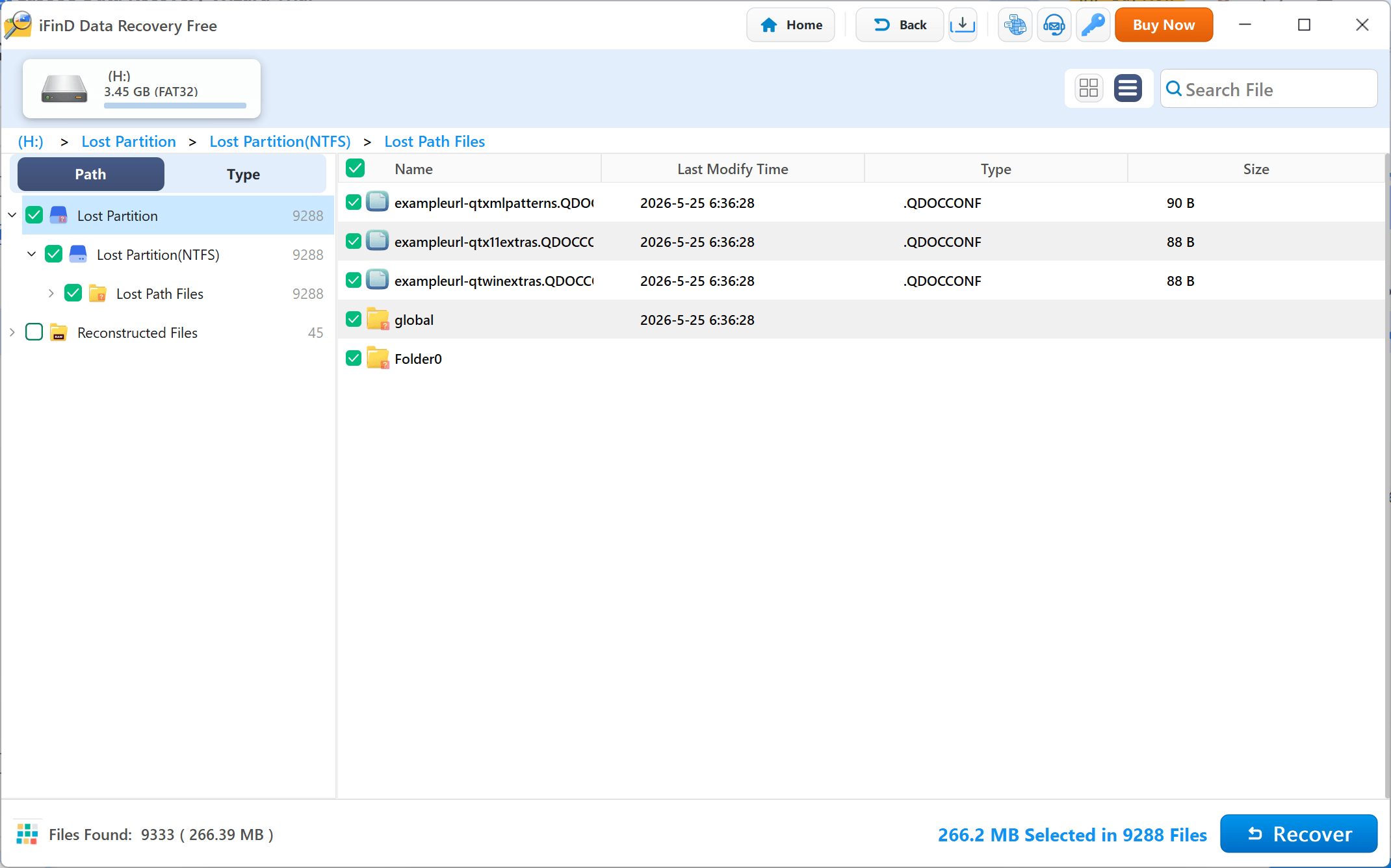
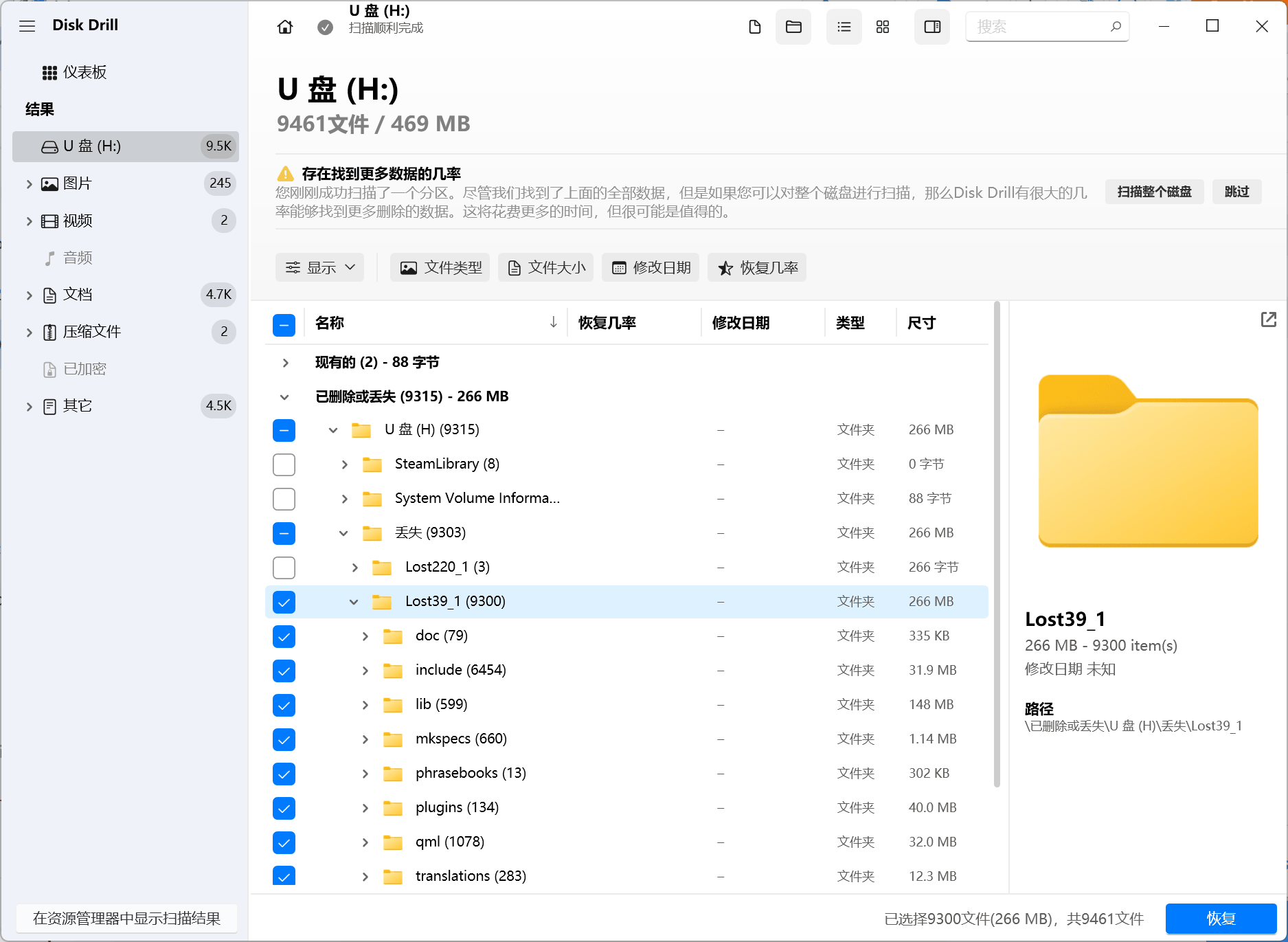
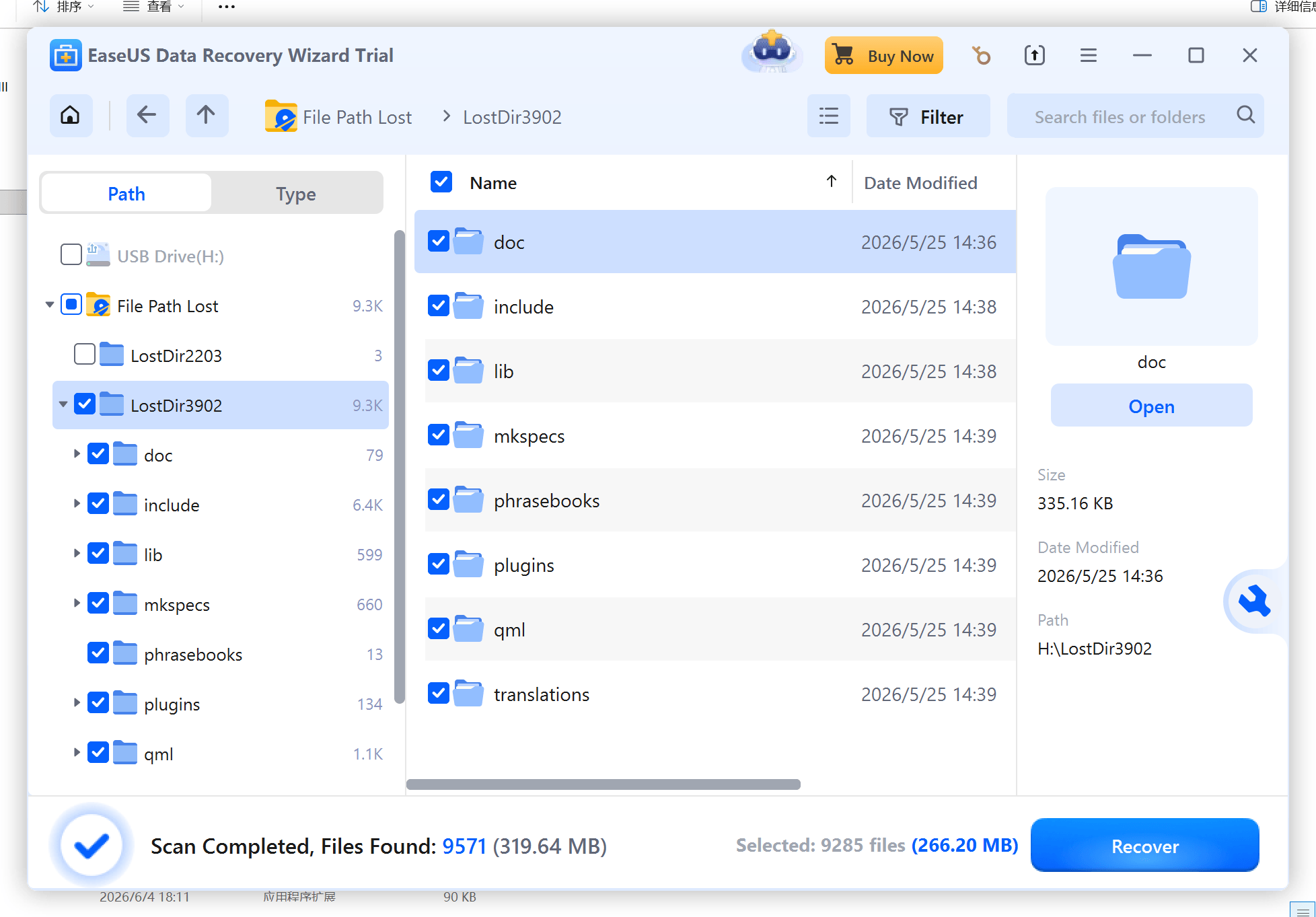
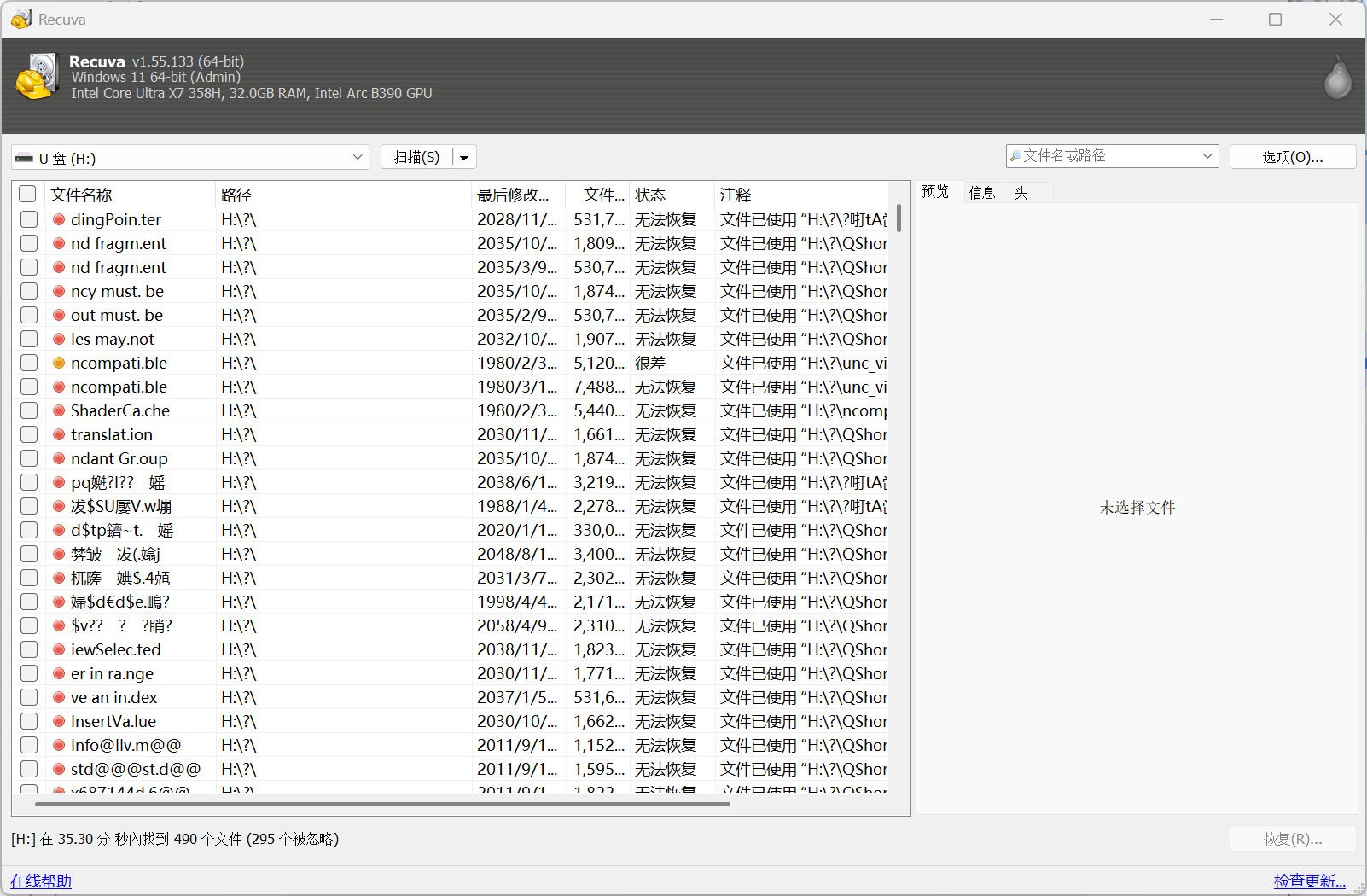
The test results show that iFinD Data Recovery achieved recovery performance comparable to other leading recovery software in this formatted SD card recovery scenario.
Disk Drill detected 9,300 recoverable files, while iFinD Data Recovery found 9,288 files. The difference between the two results was only 12 files. EaseUS Data Recovery Wizard produced a similar result with 9,285 detected files. In comparison, Recuva was unable to locate recoverable files during this formatted partition recovery test.
- iFinD successfully detected thousands of recoverable files after formatting.
- The recovery result was close to leading commercial recovery solutions.
- The difference between iFinD and the highest detection result was minimal in this test.
- Some free recovery tools may have limitations when recovering formatted storage devices.
Why This Matters for SD Card Recovery
Accidental formatting is a common data loss situation for camera users, photographers, drone operators, and anyone who stores important files on SD cards. A reliable recovery tool should not only detect lost files but also maintain file integrity and make recovered data easier to organize.
During this test, iFinD Data Recovery recovered a similar number of files compared with leading recovery tools. Recovery quality is also important because users need to quickly locate their recovered photos, videos, and other important files after formatting.
- Recover accidentally formatted camera SD cards.
- Restore lost photos, videos, documents, and other file types.
- Recover files even when the original folder structure is damaged.
- Support professional camera RAW image format recovery.
Recovery Scan Comparison
RAW Photo Recovery Test
RAW image files contain uncompressed, pure sensor data captured by professional DSLR and mirrorless cameras. They are indispensable assets for professional photographers who demand maximum dynamic range and absolute editing flexibility. Because RAW structures differ significantly from standard lossy JPEGs, a high-tier recovery engine must be capable of accurately identifying, parsing, and previewing these proprietary file formats.
In this benchmark evaluation, we comprehensively analyzed how different mainstream SD card recovery applications perform when attempting to restore deleted camera RAW photos from a controlled storage partition.
- Test Type: Professional RAW photo recovery test
- Data Loss Scenario: A batch of original camera RAW files deleted from the storage media prior to scanning
- Evaluation Criteria: Absolute RAW photo detection volume, file preview capability, folder hierarchy reconstruction, and general scanning efficiency
Tested Software Fleet:
Test Results
Test Analysis & Performance Metrics
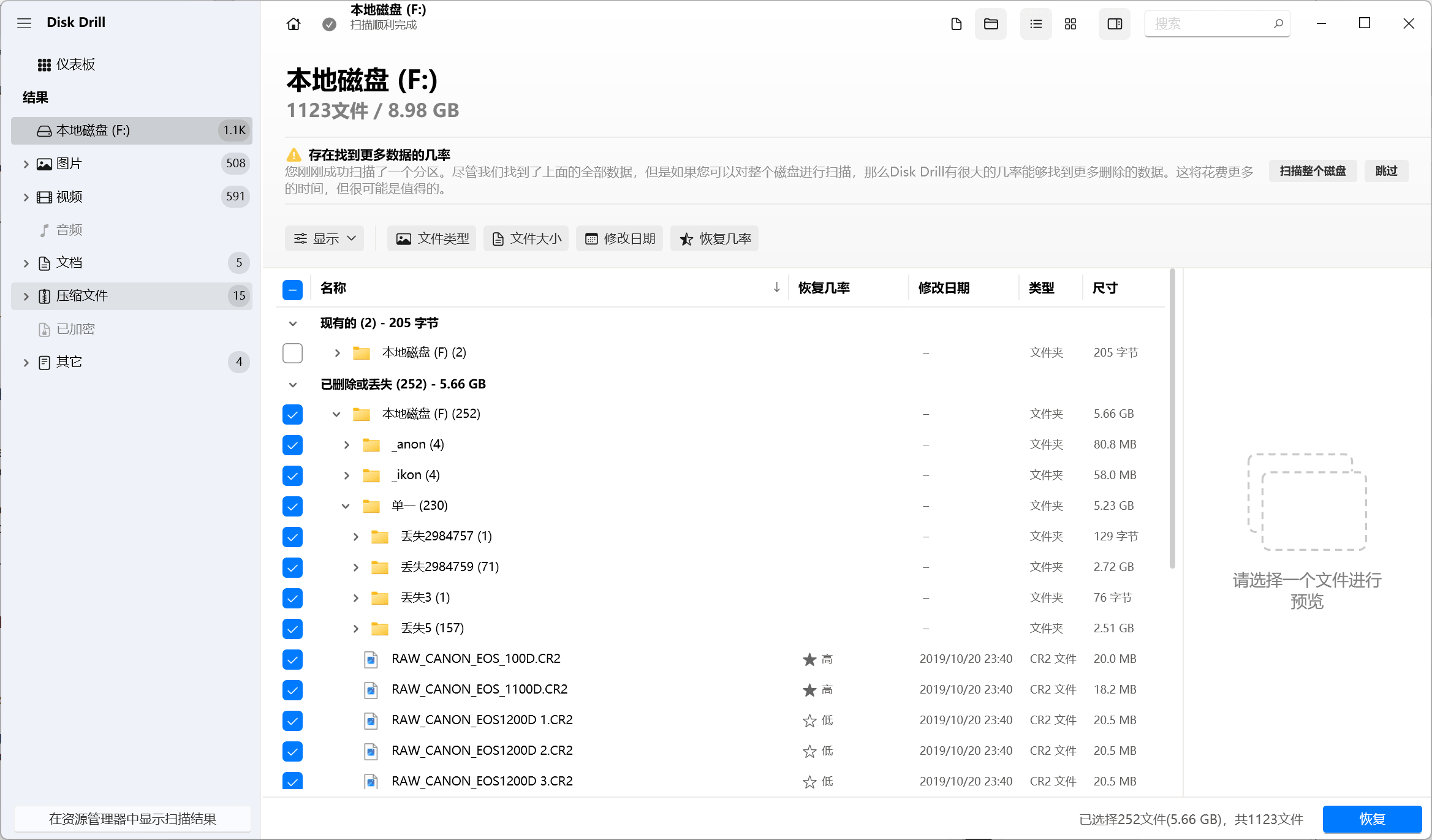
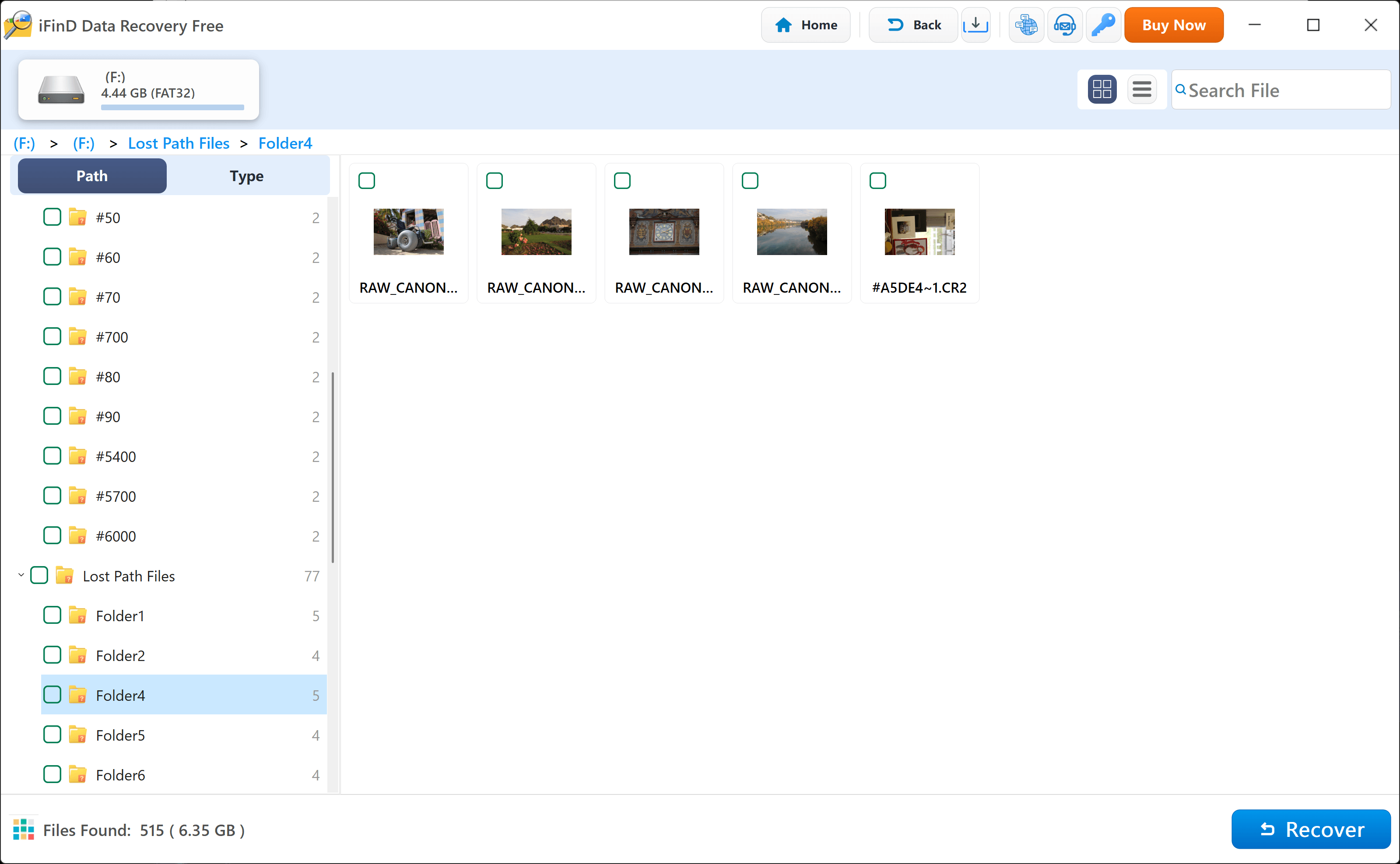
The compiled benchmark results demonstrate that Disk Drill mapped the highest absolute quantity of RAW image files at 252 items. iFinD Data Recovery closely matched this ceiling by successfully extracting 231 deleted RAW photos, securing an elite recovery signature profile with a minimal statistical footprint gap.
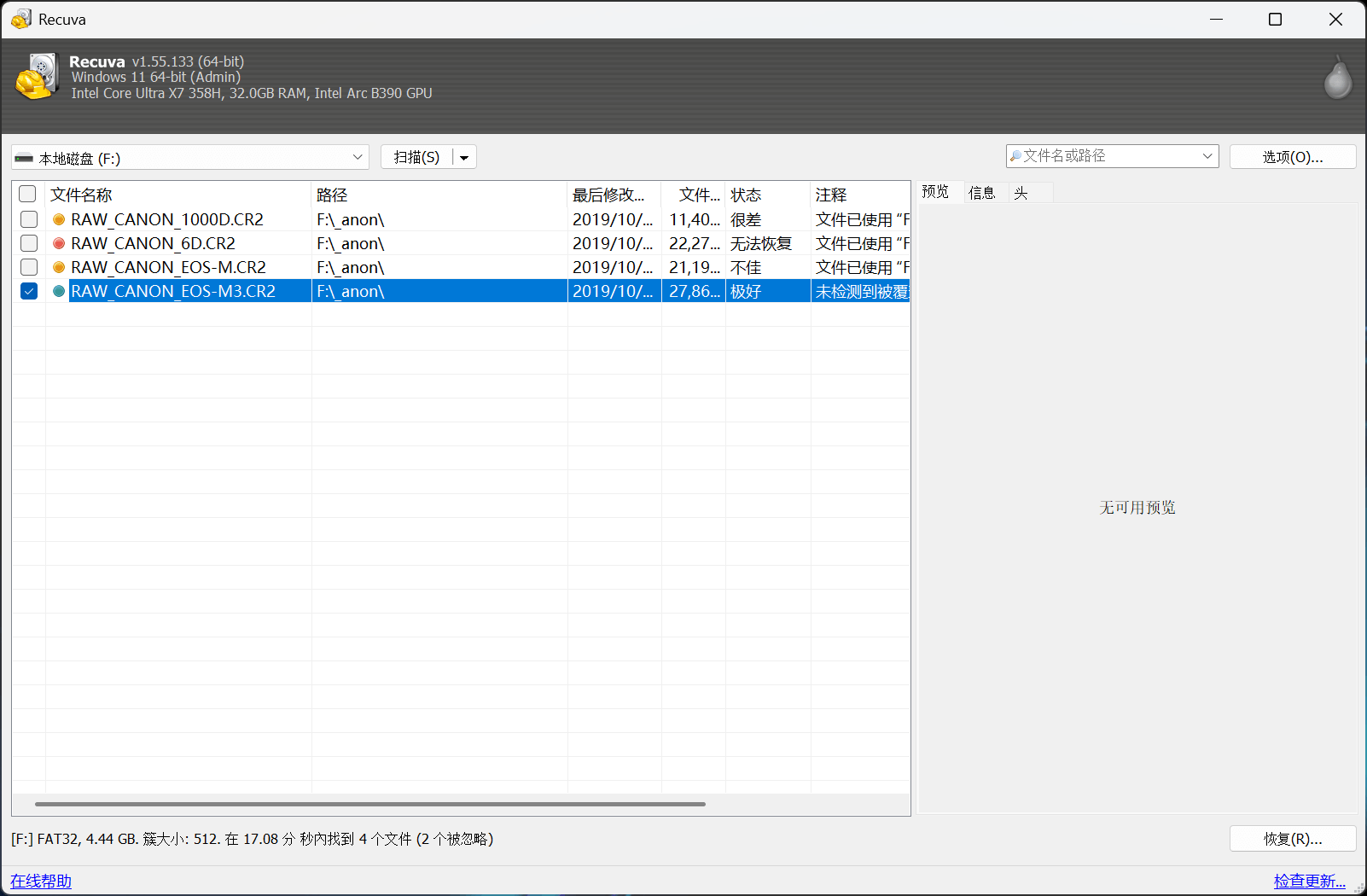
The scanning records clearly highlight that both iFinD and Disk Drill feature strong algorithmic mapping for professional camera RAW sectors, whereas legacy free tools like Recuva returned nominal results, showing extreme operational limitations when handling non-JPEG structures.
Beyond pure quantitative tracking, post-recovery file system usability is a critical factor for professional production environments. During processing, iFinD Data Recovery successfully maintained the intact original folder structure. This eliminates the tedious process of manual sorting, allowing photographers to instantly deploy their original directory workflows.
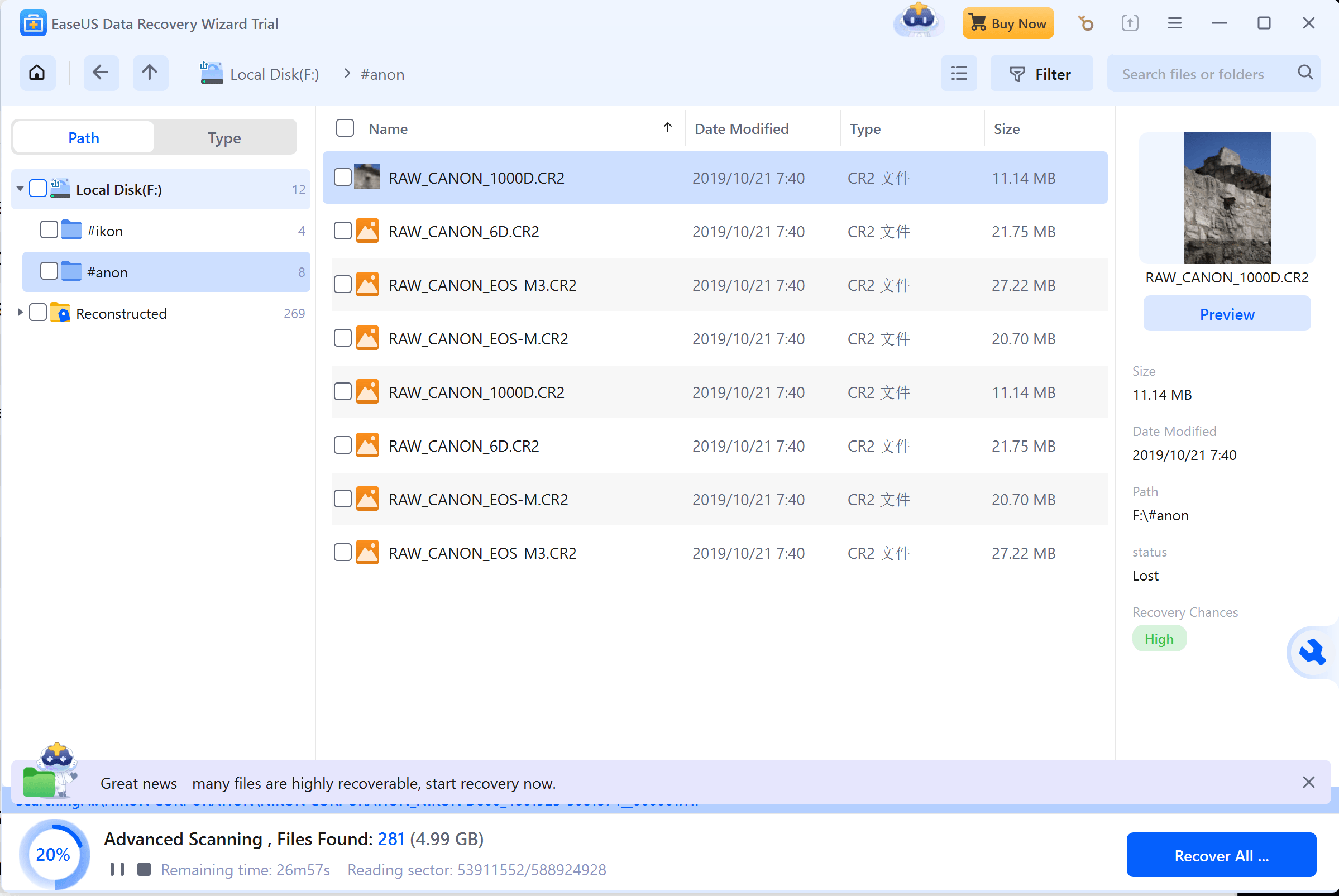
Conversely, while Disk Drill extracted the files and provided robust image previews, it scrambled the root folders, making subsequent batch management more time-consuming. EaseUS Data Recovery Wizard initiated the RAW directory scan but failed to complete it within our standard operational benchmark period, causing its volume log to remain unindexed.
Key Findings
- Comprehensive professional camera format signature recognition is non-negotiable for storage recovery.
- iFinD pairs elite volume restoration with superior folder tree preservation traits.
- Advanced cloud/local preview functions streamline user verification prior to final data exporting.
- Standard freeware utilities prove inefficient for parsing high-resolution camera storage cells.
Recovery Scan Comparison
5. Features to Look for in SD Card Recovery Software
Choosing the right SD card recovery software is not only about whether it can find deleted files. A reliable recovery tool should support different file formats, work with various storage devices, and recover files from different data loss situations.
Before selecting an SD card recovery solution, users should consider several important features, including file compatibility, device support, and professional camera RAW recovery capability.
1. Support Multiple File Types and File Systems
Many photographers use RAW formats because these files preserve more original image data from camera sensors and provide greater flexibility during professional editing. However, not all SD card recovery software can correctly identify and recover RAW image files.
When choosing SD card recovery software, photographers should check whether the tool supports RAW formats used by their cameras, especially after accidental deletion, formatting, or SD card errors.
💡 Format Compatibility: iFinD Data Recovery supports hundreds of file formats, allowing users to recover photos, videos, documents, and other important files from SD cards and other storage devices.
2. Recover Data from Different SD Card Types
SD cards come in different types and are used in cameras, drones, smartphones, and other devices. A reliable recovery tool should work with different SD card formats and storage capacities.
Users may lose files because of accidental deletion, formatting, corruption, or device errors. Therefore, SD card recovery software should be able to handle different data loss situations.
iFinD Data Recovery supports recovery from various storage devices, including SD cards, microSD cards, USB drives, SSDs, and hard drives.
Related Guides & Tutorials:
- 📷 Step-by-Step Guide: How to Recover Deleted Photos & RAW Image Files from SD Cards
- 🎥 Advanced Tutorial: How to Recover Lost Videos from SD Cards Perfectly
3. Support RAW Camera Photos for Professional Photography
Many photographers use RAW formats because these files preserve more original image data from camera sensors and provide greater flexibility during professional editing. However, not all SD card recovery software can correctly identify and recover RAW image files.
When choosing SD card recovery software, photographers should check whether the tool supports RAW formats used by their cameras, especially after accidental deletion, formatting, or SD card errors.
6. How to Choose the Right SD Card Recovery Software?
Selecting the ideal SD card recovery solution depends heavily on your unique data loss scenarios. Different users encounter completely diverse emergencies—ranging from accidentally deleted gallery photos and formatted action camera storage to corrupted memory cards or missing high-resolution RAW files.
Before licensing a professional recovery utility, it is crucial to perform a balanced evaluation across several performance baselines: absolute sector scanning capability, broad file extension compatibility, user interface accessibility, and overall cost-efficiency.
1. Choose Software Based on Your Data Loss Situation
The foundational step in data restoration is diagnosing exactly how your files vanished. Specific digital disasters demand dedicated logical algorithms to secure a successful outcome.
🔹 Deleted Photos or Videos
If your files were simple accidental deletions from a functioning card, you require an agile engine optimized for rapid sector parsing that can seamlessly rebuild common multi-media extensions.
🔗 Related Guide: How to Recover Deleted Photos from SD Cards
🔹 Formatted SD Card
When a camera or computer system deploys a fresh format command, standard file indexing maps are entirely broken. In this scenario, you must deploy an advanced utility capable of performing root cluster carving to extract orphaned directory fragments.
🔗 Related Guide: How to Recover Data from a Formatted Drive
🔹 RAW Camera File Loss
Professional photography tasks rely on complex, uncompressed sensor mappings. Standard recovery programs frequently corrupt these streams, making specialized camera signature recognition an absolute requirement.
📷 Advanced Guide: Recover Deleted Photos from Different Devices
2. Check Supported File Types and Devices
A professional-grade recovery application must extend far beyond basic JPEG scanning. Modern storage frameworks hold cross-platform pipelines containing high-definition video codes, secure project documents, and distinct drone or camera architecture footprints.
Photographers working within demanding studio workflows should proactively cross-reference explicit RAW extension compatibility matrices before deciding on their long-term recovery toolkit.
3. Consider Recovery Performance and Preview Features
While brute scan speeds and theoretical raw file counts remain highly valuable metrics, they do not solely dictate a flawless user experience.
True professional software must provide an explicit, real-time file preview environment prior to initiating the actual sector export phase. This critical visual check allows users to instantly verify structural integrity, confirming that the targeted images or video streams are fully healthy and functional rather than corrupted.
💡 Interactive Preview: iFinD Data Recovery integrates a robust, native real-time preview matrix supporting hundreds of high-resolution file signatures, giving photographers instant verification of their original RAW files before saving them.
4. Compare Free Recovery Limits and Pricing
Financial value scales remain a key variable when locking down your deployment program. Many utilities on the market lure users with free scans, only to completely lock actual data restoration behind steep, immediate paywalls.
An ethical and practical approach is opting for vendors who grant a generous, transparent free tier. This empowers everyday consumers to comprehensively stress-test true operational recovery outcomes in their local environments before spending a single dollar.
💰 Transparent Value: iFinD Data Recovery stands out by providing up to 1GB of completely free file restoration capacity, allowing users to safely resolve smaller data loss accidents with full parsing performance and zero upfront fees.
Ultimately, the ideal SD card recovery utility must deliver a precise equilibrium across processing power, diverse file mapping options, user accessibility, and fair pricing rules. If you need to quickly rescue deleted wedding projects, action sports logs, or studio camera files, investing in a utility built on expansive format libraries and certified sector stability will decisively maximize your success rate.
7. FAQ
What is the best SD card recovery software?
The best SD card recovery software depends heavily on your specific needs, including the type of files you intend to restore, the storage device architecture, and the root cause of data loss. A professional-grade utility should feature robust sector-level scanning, comprehensive file compatibility, clear interactive previews, and high success rates across diverse scenarios like accidental deletion, emergency formats, or file system corruptions.
iFinD Data Recovery is specifically engineered to meet these high standards, offering a streamlined, user-friendly production workflow that delivers elite performance when extracting deleted photos, videos, documents, and professional camera RAW files from standard memory cards.
Can SD card recovery software recover permanently deleted photos?
Yes, professional recovery software can successfully restore permanently deleted photos, provided that the underlying storage space has not been overwritten by new active data. When a file command executes a deletion on an SD card, the system merely marks that sector cluster as available for rewriting while the raw binary photo signatures remain intact.
To maximize your recovery odds, you must stop utilizing the flash media immediately following a data loss incident. You can then deploy a dedicated sector scan using our comprehensive guide to recover deleted photos from SD card frameworks before those sectors are permanently overwritten.
Can I recover photos from a formatted SD card?
Yes, it is entirely possible to restore high-resolution photography projects after an accidental card format. Standard formatting routines typically wipe only the external root file directories and allocation tables, leaving the structural data clusters untouched inside the memory cells.
Advanced data carving applications can easily run deep raw-sector parsing sequences to re-index these orphaned records. However, your success rate is directly bound to absolute device isolation—saving new media to the formatted card will destroy the hidden files. You can cross-reference our local formatted recovery benchmark test to see exactly how professional engines stack up during partition extraction.
Can SD card recovery software recover RAW camera photos?
Yes, but this requires specialized signature reconstruction algorithms. Because uncompressed RAW images contain complex proprietary sensor data unique to each manufacturer, basic data recovery programs frequently return corrupted, unopenable files.
iFinD Data Recovery features native, signature-level tracking specifically optimized for elite studio setups. It supports precise extraction for mainstream camera extensions, including Canon CR2/CR3, Nikon NEF, Sony ARW, Fujifilm RAF, and other professional multi-track imagery. For detailed step-by-step procedures, consult our dedicated article on how to recover camera RAW files seamlessly.
How long do deleted photos stay recoverable on an SD card?
Deleted files do not possess a fixed expiration date or time limit. They remain perfectly indexable and recoverable until subsequent write operations overwrite the exact storage boundaries they reside on.
Allowing an SD card to remain in active use after a data loss disaster drastically increases the structural risk of generating permanent, unrecoverable fragmentation. For the most secure outcome, completely pull the memory card from your camera or drone immediately and process the scanning script as soon as possible.
Does SD card recovery software work with corrupted SD cards?
Yes, software-driven data recovery can effectively parse corrupted SD cards, depending entirely on the nature and structural scale of the logical damage. If your operating system still detects the drive letter but locks access with "RAW file system," "Access Denied," or formatting prompts, advanced recovery engines can safely bypass those system blocks to read the raw data cells.
However, if the flash card suffers severe physical controller failure, cracked hardware traces, or fails to initialize at a hardware connection level across multiple card readers, standard software utilities will be unable to parse the storage, and a specialized physical lab service may be required.
Is free SD card recovery software enough?
Free data recovery utilities can be highly useful for minor individual accidents, restoring tiny document logs, or simply confirming whether deleted files are still technically discoverable on the flash sectors.
Unfortunately, most freeware options enforce rigid recovery size boundaries or lack the deeper data-carving algorithms required to reassemble complex directory structures. To offer the ideal balance of commercial reliability and transparent proof-of-concept value, iFinD Data Recovery provides up to 1GB of completely free data recovery capacity. This allows photographers to thoroughly verify actual parsing results and restore high-resolution projects before committing to a commercial plan.
Professional Data Recovery Shouldn’t Cost a Fortune.
iFinD delivers the exact same industry-leading recovery rates as the most expensive competitors, but at the market’s most affordable price. Start free with 1GB, and upgrade for less.