
Last Updated on July 20, 2026 by andy woo
Have you accidentally deleted important photos from your computer, camera, SD card, or phone?
Even permanently deleted photos may still be recoverable if the storage space has not been overwritten. This guide explains how to recover permanently deleted photos using iFinD Data Recovery and other available recovery methods.
Whether your photos were deleted by mistake, lost after formatting, or disappeared from an SD card, you can follow the steps below to restore them.
- 01 1. Can Permanently Deleted Photos Be Recovered?
- 02 2. Common Reasons Why Photos Are Permanently Deleted
- 03 3. Method 1. Recover Permanently Deleted Photos Using iFinD Data Recovery
- 04 4. Method 2. Recover Deleted Photos from Backup
- 05 5. Method 3. Recover Photos from SD Cards and Cameras
- 06 6. How to Prevent Permanent Photo Loss
- 07 7. Frequently Asked Questions
1. Can Permanently Deleted Photos Be Recovered?
When you delete photos from a computer, camera, or SD card, the files are not always immediately erased from the storage device.
Instead, the system marks the space occupied by deleted photos as available for new data. If new files have not overwritten that space, professional photo recovery software may still be able to find and restore them.
However, the chances of recovery depend on several factors, including how long ago the photos were deleted, whether the storage device is still being used, and whether new data has been written.
2: Common Reasons Why Photos Are Permanently Deleted
Photos can become permanently deleted or inaccessible for many reasons, including:
– Accidental deletion
– Formatting an SD card or storage device
– Camera or phone errors
– Corrupted file systems
– Virus or malware attacks
– Hardware failure
In many cases, users only realize they need these photos after they have already been deleted.
3: Method 1. Recover Permanently Deleted Photos Using iFinD Data Recovery
1: Why Choose iFinD Data Recovery?
iFinD Data Recovery is designed to help users recover permanently deleted photos from different storage devices, including computers, external drives, SD cards, and digital cameras. Besides computer storage devices, iFinD Data Recovery also supports SD card recovery for cameras, phones, and other devices.
Unlike basic recovery tools, iFinD Data Recovery supports a wide range of image formats, including common formats such as JPG and PNG, as well as professional camera RAW formats. With advanced scanning technology, it can perform RAW photo recovery for files from cameras and memory cards, including formats such as CR2, CR3, NEF, ARW, and RAF.
Whether your photos were deleted accidentally, lost after formatting, or disappeared due to storage device errors, iFinD Data Recovery can help locate recoverable files before they are overwritten. It also supports video and other file types, making it a complete solution for recovering lost digital data from various devices.
2: Supported Devices and Formats
A Step-by-Step Guide to Photo Recovery with iFinD Data Recovery
Recovering permanently deleted photos may seem complex and daunting, but iFinD Data Recovery can make it much more straightforward. Here’s how iFinD Data Recovery can help get those precious memories back:
Launch iFinD Data Recovery
The first step is to run the software iFinD Data Recovery on your computer; its easy-to-use interface will help you complete your task successfully from the beginning to the end.
Professional Data Recovery Shouldn’t Cost a Fortune.
iFinD delivers the exact same industry-leading recovery rates as the most expensive competitors, but at the market’s most affordable price. Start free with 1GB, and upgrade for less.
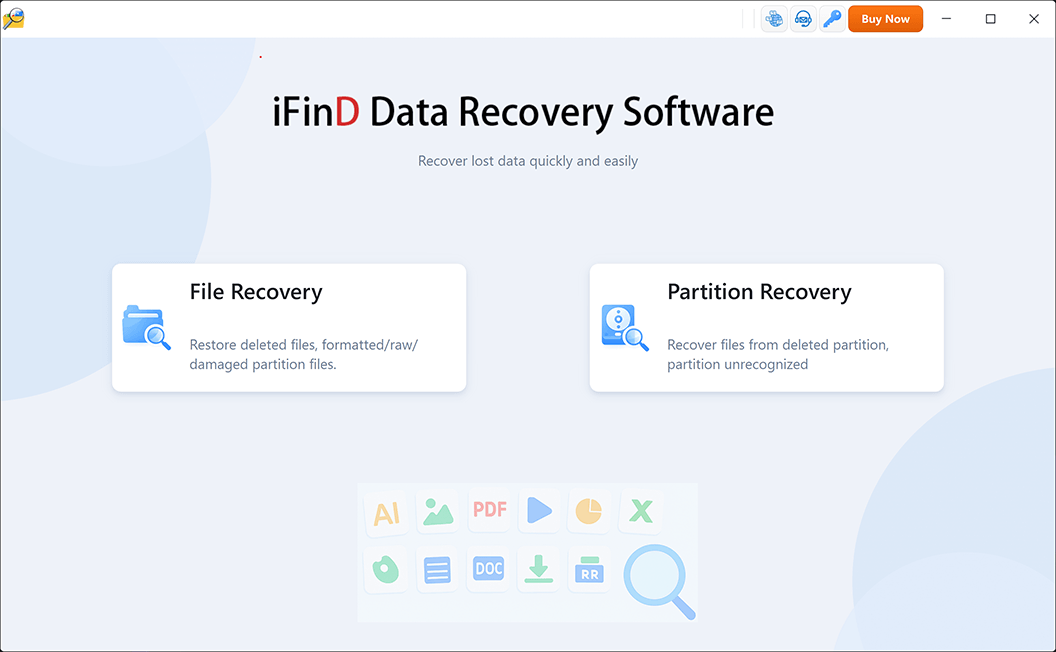
Select Recovery Mode
Your data recovery choices are “File Recovery” or “Partition Recovery.”
If the partition where your photos were stored is still visible and can be recognized by Windows, choose “File Recovery” mode.
This mode is designed to scan the selected drive or partition for deleted files and recover photos that are no longer accessible but have not been overwritten.
However, if the partition or drive is missing, damaged, or cannot be detected by Windows, choose “Partition Recovery” instead.
In this situation, your first goal is not to recover individual photos, but to restore the lost partition structure. Once the missing partition is recovered, you can access and recover the photos stored on it.
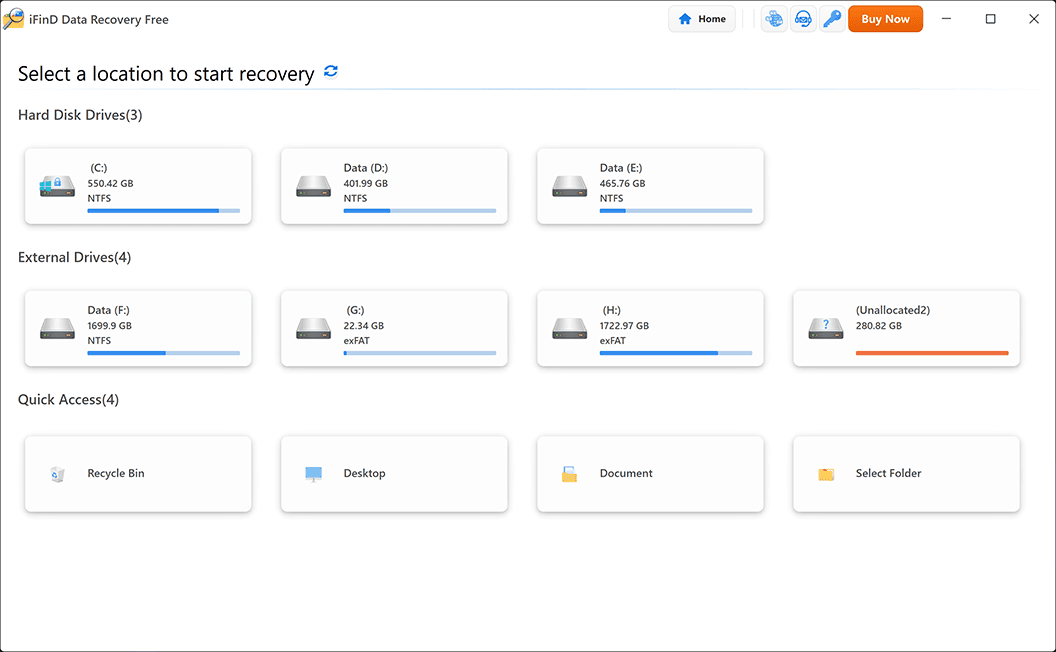
Select an Affected Device
Next, locate and choose the drive or external device where your deleted photos were saved – such as USB flash drives or digital camera memory cards – where they were stored. iFinD Data Recovery supports many devices to ensure smooth recovery due to compatibility issues.
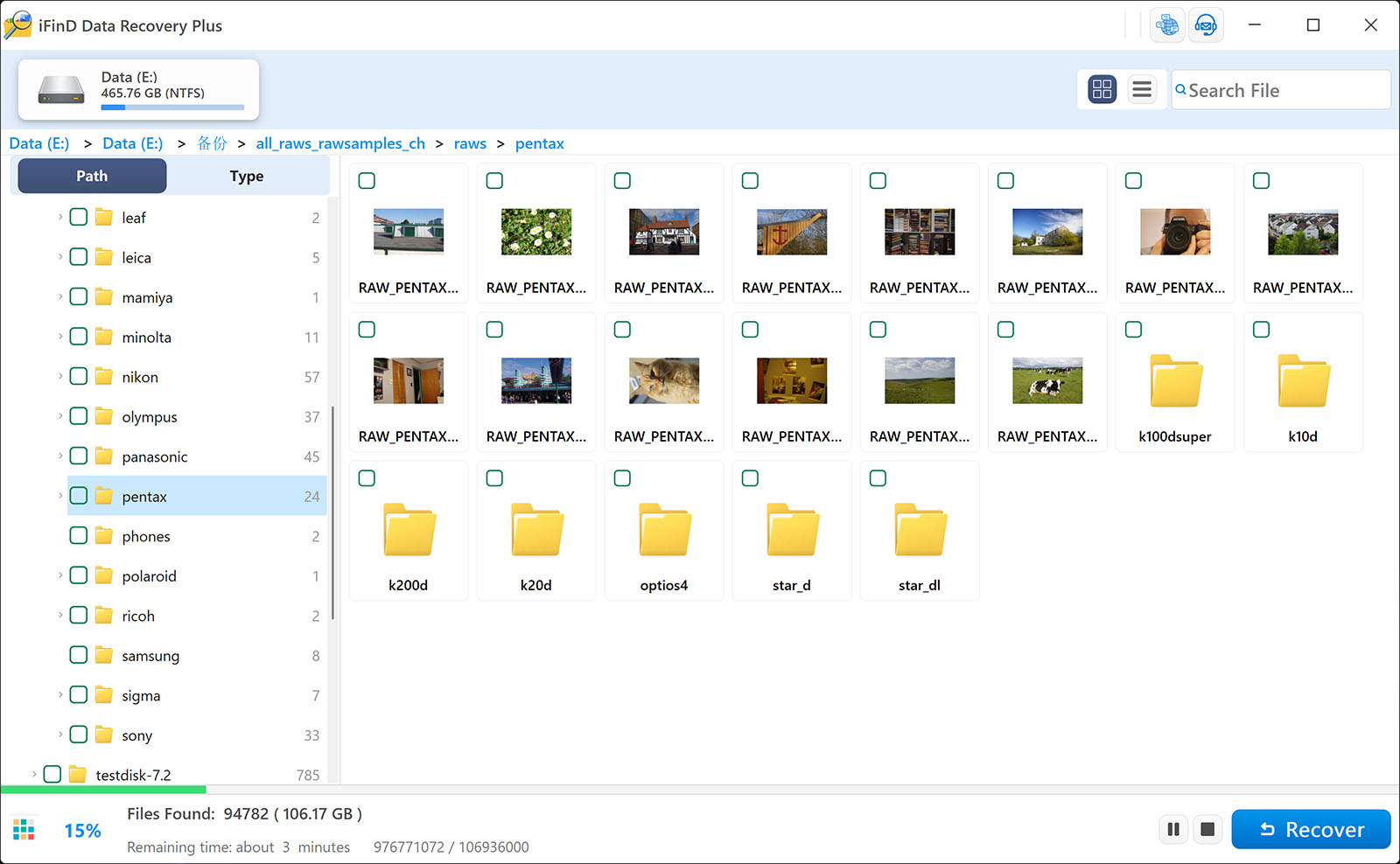
Start Scanning
Once the target location has been chosen, iFinD Data Recovery uses advanced scanning algorithms to search for lost files that are no longer visible or accessible. Besides recovering deleted photos, it can also restore videos, documents, and other types of lost data from HDDs, SSDs, SD cards, USB drives, and other storage devices.
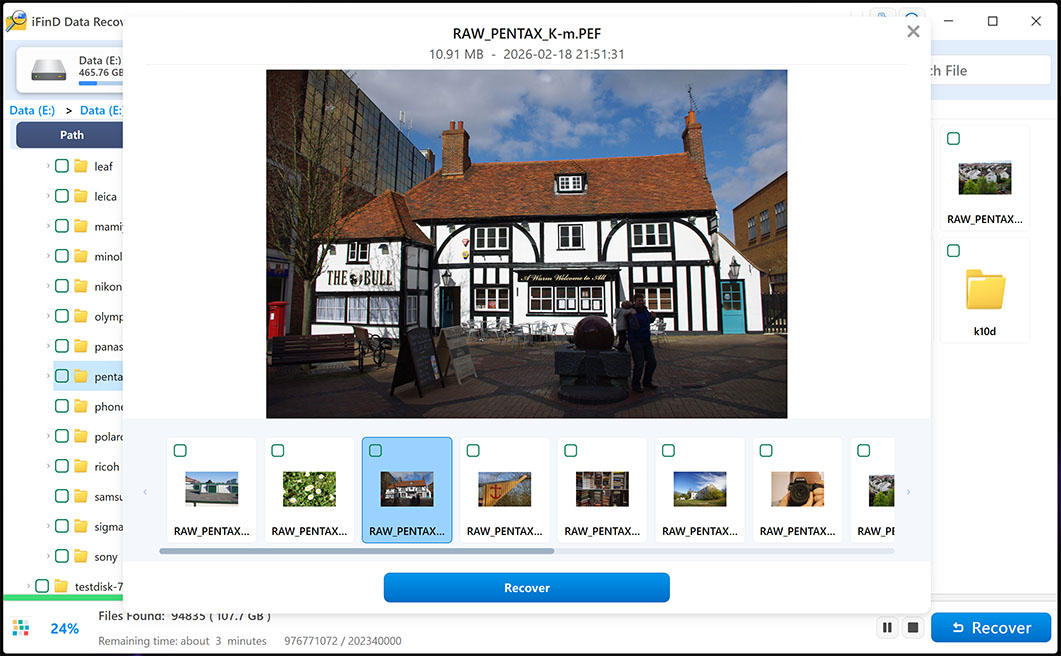
Preview and Select Recovery
After scanning, iFinD Data Recovery displays a list of recoverable files; previewing these is key in order to recover only what you intend. Moreover, its integrity check feature gives peace of mind as to the integrity of every image before retrieval.
Recover Your Photos
Press’ Recover’ once you’ve identified and chosen to recover photos from an external storage device or your PC hard disk drive. Choose a location on either device where these newly recovered files can be safely saved to avoid accidental data overwriting.
Follow these simple steps with iFind Data Recovery to make recovering permanently deleted photos easy and stress-free. Whether your vacation photos have gone down the drain or family memories are being erased permanently from memory banks, iFind Data Recovery stands as your dependable partner in data recovery, helping ensure what was lost can once more be preserved forever.
4: Method 2. Recover Deleted Photos from Backup
Before using data recovery software, it is worth checking whether you have a backup of your deleted photos.
Depending on where your photos were stored, you may be able to restore them from:
– Windows File History or Backup
– Google Photos
– iCloud Photos
– External hard drive backups
If a backup is available, restoring photos from the backup is usually the fastest and safest recovery method.
However, many users cannot find a usable backup after accidental deletion or device failure. In this case, iFinD Data Recovery can help scan the storage device and recover lost photos directly.
5.: Method 3. Recover Photos from SD Cards and Cameras
Many deleted photos come from digital cameras, DSLR cameras, mirrorless cameras, and SD cards.
When photos are deleted from a camera memory card, the files are often still recoverable until new data overwrites the storage space.
For detailed instructions on recovering photos from camera RAW files and SD cards, see our complete guide:
6: How to Prevent Permanent Photo Loss
Although deleted photos can often be recovered, prevention is always better than recovery. The following practices can help protect your important photos:
– Create regular backups of important photos.
– Enable cloud synchronization for phone photos.
– Safely eject SD cards and external storage devices.
– Avoid continuing to use a storage device after accidental deletion.
– Keep multiple copies of valuable photos on different devices.
7. Frequently Asked Questions
Can I recover photos from a formatted drive?
Yes, iFinD Data Recovery can recover photos from drives that have been formatted, provided the data hasn’t been overwritten with new files.
Is it possible to recover RAW photos from my camera?
iFinD Data Recovery supports RAW photo recovery from various camera brands and models to allow professional photographers to recover their work.
How long does the recovery process take?
The duration of the recovery process depends on the size of the data being recovered and the scan mode selected. However, iFinD Data Recovery is designed for quick and efficient scanning, often recovering 1GB of data in about a minute.
Can permanently deleted photos be recovered without software?
Sometimes. If you have a backup, cloud copy, or recently deleted folder, you may recover photos without recovery software. However, if the files are permanently deleted and no backup exists, professional recovery software may be required.
Final Thoughts
Losing photographs may be heartbreaking, but with iFinD Data Recovery, there’s hope. Compatible with various file types and devices, as well as offering comprehensive feature sets, iFinD Data Recovery is an indispensable solution to data loss issues. By following its straightforward methods, you should shortly be on your way back to regaining memories quickly – remember, iFinD Data Recovery can be your trusted ally when it comes to data recovery!
Professional Data Recovery Shouldn’t Cost a Fortune.
iFinD delivers the exact same industry-leading recovery rates as the most expensive competitors, but at the market’s most affordable price. Start free with 1GB, and upgrade for less.