Last Updated on July 20, 2026 by andy woo
Lost photos from your SD card due to accidental deletion, formatting, or corruption?
Don’t worry. Deleted photos are not immediately erased from an SD card. As long as new data has not overwritten the storage space, you may still be able to recover deleted photos from an SD card using professional data recovery software.
This guide explains how to recover deleted photos from SD cards, including formatted SD cards, corrupted memory cards, and camera SD cards. We will also show you how to recover RAW files from SD cards used in Canon, Nikon, Sony, and other digital cameras with iFinD Data Recovery.
- 01 1. Why Are Photos Deleted or Lost from an SD Card?
- 02 2. Can Deleted Photos Be Recovered from an SD Card?
- 03 3. How to Recover Deleted Photos from SD Card with iFinD Data Recovery
- 04 4. Recover RAW Photos from SD Cards Used in Digital Cameras
- 05 4. Recover RAW Photos from SD Cards Used in Digital Cameras
- 06 6. How to Prevent Photo Loss from SD Cards
- 07 7. FAQ
1. Why Are Photos Deleted or Lost from an SD Card?
Understanding how data loss occurs on an SD card is the first step toward successful recovery. Google and search engines highly value this context because it helps users diagnose their specific situations. Generally, RAW photos disappear from memory cards due to a few common logical or physical disruptions:
- Accidental Deletion: It is incredibly easy to mistakenly press “Delete All” instead of removing a single blurry shot, or accidentally wipe a folder during routine data clearing.
- Intentional or Accidental Formatting: Formatting the SD card—either inside the digital camera or on your computer—clears the entire file allocation table, making the card appear completely empty even though the underlying RAW data blocks remain intact.
- Memory Card Corruption: Pulling the SD card out of a card reader or camera while it is still actively reading or writing data is a prime cause of corrupted storage blocks.
- Camera Errors & Glitches: Sudden low battery shutdowns mid-shoot, firmware freezes, or write-speed mismatches can cause a camera to improperly save images, leaving behind unreadable or zero-byte files.
- Virus or Malware Attacks: Connecting your camera’s SD card to an infected computer can introduce malware that alters file attributes, hides your photo partitions, or corrupts the root directory.
- File System Damage: Severe logical errors can damage the core file system parameters (such as FAT32 or exFAT directories). When Windows or your camera can no longer read the file system structure, it will usually trigger a prompt demanding you format the card before use.
2. Can Deleted Photos Be Recovered from an SD Card?
1. Before deletion: video is accessible
Actual video frame data on disk
2. After deletion: only the index entry is removed
Blocks are marked "free" but content is untouched
3. Recovery: software rescans disk, rebuilds index
The video can be restored if not yet overwritten
3. How to Recover Deleted Photos from SD Card with iFinD Data Recovery
If you frequently recover photos from camera memory cards, choosing reliable SD card recovery software can improve recovery success rates.
Step 1 Install iFinD Data Recovery
The first step is to install and launch iFinD Data Recovery on your computer. The simple interface makes it easy to start recovering deleted photos from SD cards, memory cards, and other storage devices.
Unmatched Price-to-Performance
Professional Data Recovery Shouldn’t Cost a Fortune.
iFinD delivers the exact same industry-leading recovery rates as the most expensive competitors, but at the market’s most affordable price. Start free with 1GB, and upgrade for less.
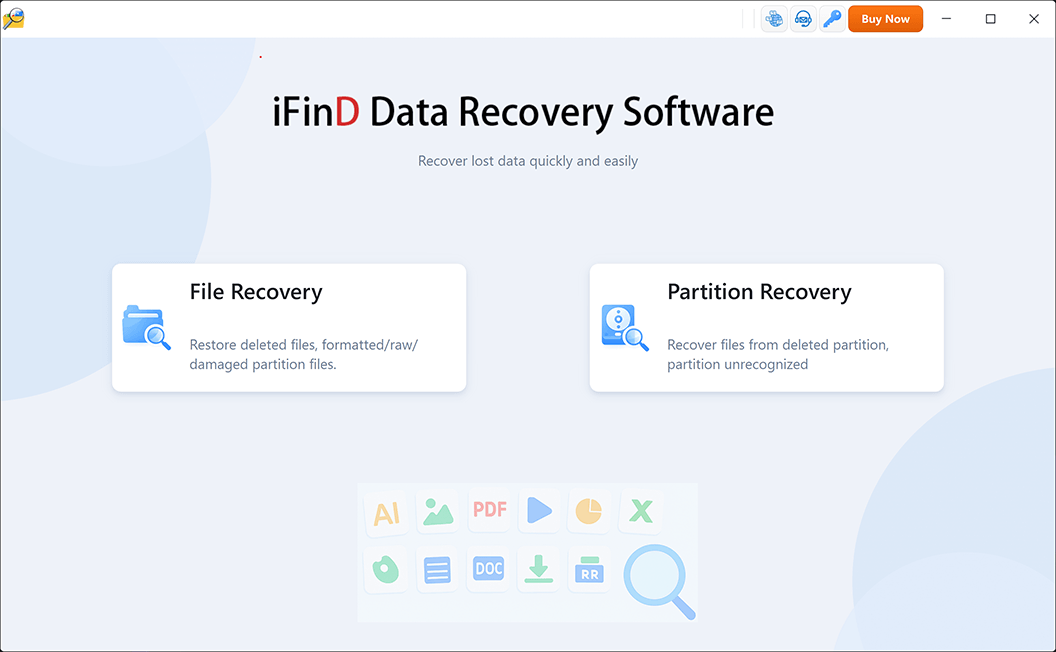
Step 2 Select File or Partition Recovery
If your SD card is missing, shows incorrect capacity, or cannot be detected properly, choose Partition Recovery.
In this situation, the priority is to recover the lost partition or storage structure first. Once the SD card becomes accessible again, you can continue recovering your photos and other files.
In this situation, your first goal is not to recover individual files, but to restore the lost partition structure. Once the missing partition is recovered, you can access and recover the files stored on it.
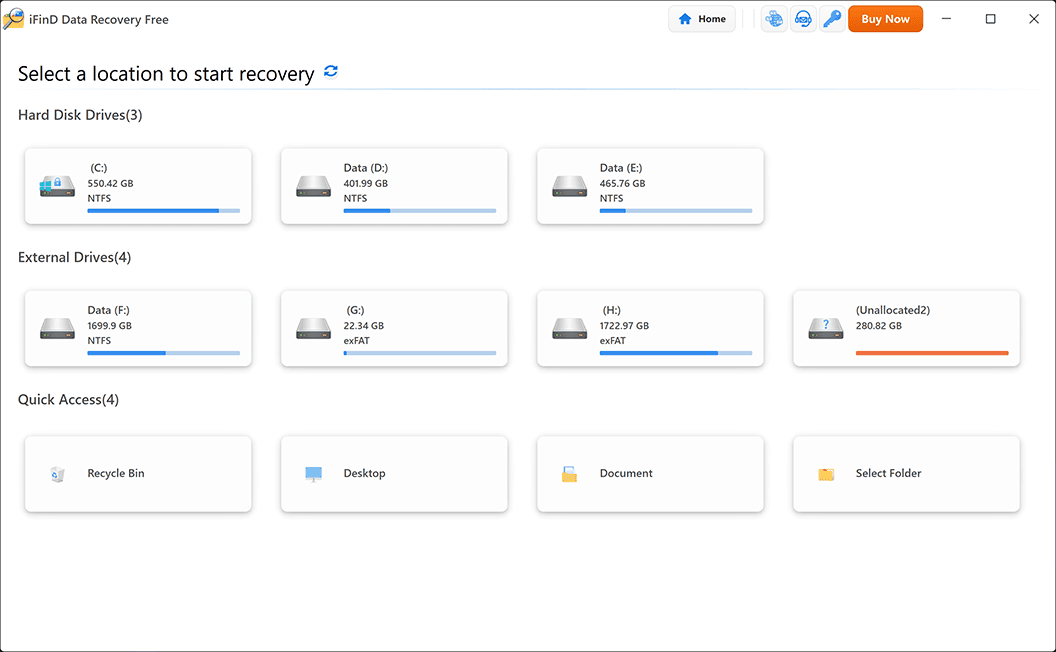
Step 3 Select the Location Where RAW Photos Were Lost
Select the SD card or memory card where your deleted photos were stored.
iFinD Data Recovery supports many storage devices, including SD cards, microSD cards, CF cards, USB drives, and external storage devices used in digital cameras.
Step 4 Scan and Preview Deleted Files
After selecting your SD card, start the scan process. iFinD Data Recovery will search for deleted photos and display recoverable files in real time.
You can preview found images before recovery to confirm whether your lost photos can be successfully recovered.
Besides photos, the software can also recover deleted videos, documents, audio files, and other data from the same SD card.
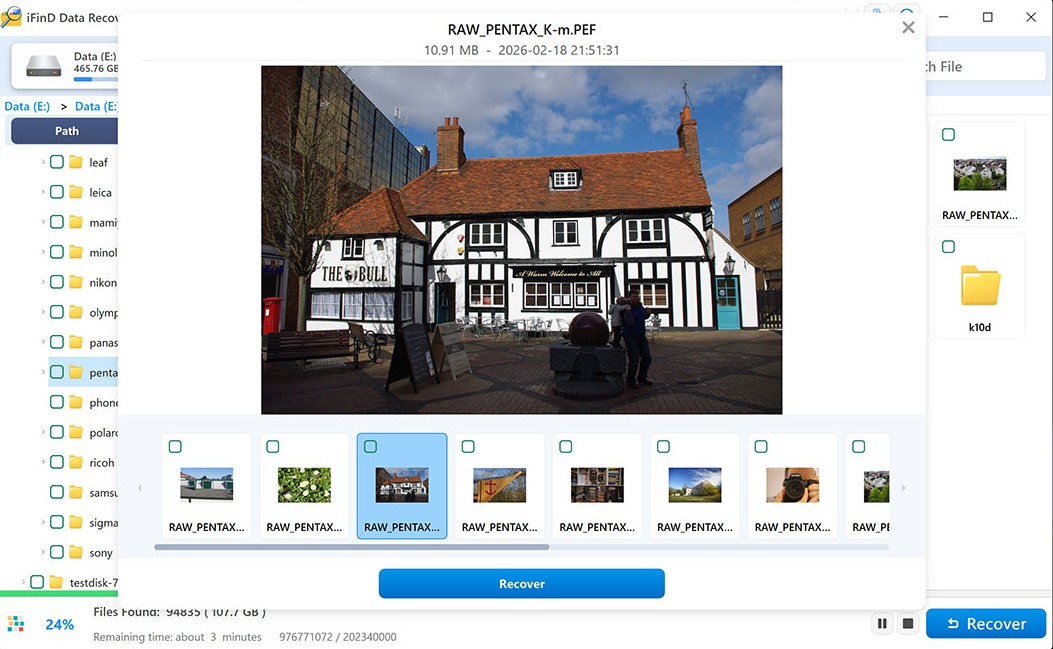
Step 5 Recover Lost Files to a Safe Location
After previewing the photos you want to recover, click the Recover button and choose a safe location to save the recovered files.
Important: Do not save recovered photos back to the same SD card where they were deleted, because new data may overwrite other recoverable files.
For example, if you are recovering photos from a camera SD card, save the recovered files to your computer’s hard drive or another external storage device.
4. Recover RAW Photos from Camera SD Cards
Most professional DSLR and mirrorless cameras capture images in RAW formats rather than compressed JPEGs. Because RAW files preserve uncompressed, pure sensor data, they grant photographers maximum dynamic range and unmatched flexibility during post-processing.
If your camera's memory card encounters unexpected data loss, iFinD Data Recovery features deep-sector scanning technology optimized for signature-level reconstruction. It provides native support for recovering RAW image files from all mainstream photography brands:
Whether your high-resolution RAW photos were deleted accidentally, wiped during an emergency format, or became inaccessible due to sudden "RAW file system" SD card errors, iFinD can safely parse the storage clusters to piece your original photography projects back together.
5. Recover Photos from Different SD Card Problems
| Problem | Solution |
|---|---|
| Accidentally deleted photos | Use File Recovery |
| Formatted SD card | Stop using card and scan |
| Corrupted SD card | Use recovery software |
| SD card not detected | Check card reader |
6. How to Prevent Photo Loss from SD Cards
- Backup photos regularly
- Safely eject SD cards
- Avoid formatting without backup
- Use reliable cards
7. FAQ
Can deleted photos be recovered from an SD card?
Yes, deleted photos from an SD card can often be recovered if the storage space has not been overwritten by new data. When photos are deleted, the actual file data usually remains on the SD card, while the system only marks the space as available for new files.
To recover deleted photos from an SD card, stop using the card immediately and use reliable data recovery software such as iFinD Data Recovery to scan for recoverable files. The sooner you start the recovery process, the higher the chance of recovering your lost photos.
Can I recover photos from a formatted SD card?
Yes, you may be able to recover photos from a formatted SD card. Formatting usually removes the file system information instead of immediately deleting all photo data stored on the card.
If you accidentally formatted a camera SD card, avoid saving new photos or files to the card. iFinD Data Recovery can scan formatted SD cards and help recover lost photos, videos, RAW images, and other file types before the original data is overwritten.
Can I recover RAW photos from a camera SD card?
Yes. RAW photos deleted or lost from a camera SD card may still be recoverable if the storage space has not been overwritten.
iFinD Data Recovery supports RAW photo recovery from many popular camera brands and formats, including Canon CR2/CR3, Nikon NEF, Sony ARW, Fujifilm RAF, Panasonic RW2, and other professional camera RAW files.
Whether RAW photos were deleted accidentally, lost after formatting, or disappeared due to SD card errors, recovery software can help scan the card and locate recoverable image files.
How long can deleted photos stay recoverable?
Deleted photos can remain recoverable until the storage space they occupy is overwritten by new data. There is no fixed time limit because recoverability depends on how much the SD card has been used after deletion.
For the best chance of successful SD card photo recovery, stop taking new photos, avoid copying files to the card, and start the recovery process as soon as possible.
Does SD card recovery work after corruption?
Yes, SD card recovery may still work after corruption, depending on the condition of the card and whether the original data has been overwritten.
Common signs of SD card corruption include the card not being recognized, asking for formatting, missing photos, or unreadable files. iFinD Data Recovery can scan corrupted SD cards and attempt to recover lost photos, videos, and other important files from the remaining data. If your SD card is corrupted, you can also learn how to repair and recover data from a corrupted SD card.
What types of files can be recovered from an SD card?
- recover deleted videos from SD card
- RAW photo recovery from SD cards
- recover documents from memory card
Professional Data Recovery Shouldn’t Cost a Fortune.
iFinD delivers the exact same industry-leading recovery rates as the most expensive competitors, but at the market’s most affordable price. Start free with 1GB, and upgrade for less.